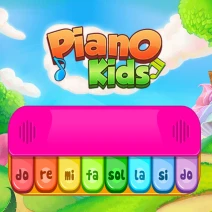
Piano Kids
How to Play Piano Kids
Learn to play melodies by pressing the correct piano keys as shown on screen. Use your mouse, keyboard, or touch screen to interact with the virtual piano and complete musical challenges.
Controls Guide
- Press keyboard keys corresponding to piano notes (usually letters A to L)
- Click piano keys using your mouse
- Tap piano keys on touch-enabled devices
Play Piano Kids: Learn Music with Fun and Rhythm Online
Dive into Piano Kids, an engaging music practice game designed especially for children to learn tunes and songs while having fun. This browser-based HTML5 game offers instant play with no downloads, making it perfect for desktops, tablets, and mobiles. Enjoy simple controls and interactive lessons that encourage creativity and musical skill development. With colorful visuals and playful characters, it keeps kids entertained as they master piano basics.
Piano Kids Gameplay and Features
In Piano Kids, players interact with a virtual piano keyboard to play melodies and songs, improving timing and note recognition. The game uses intuitive controls suitable for mouse, touch, or keyboard, making it accessible for all ages. Each level introduces new songs and challenges that increase in complexity, encouraging players to practice and perfect their skills.
- Engage with a variety of fun, colorful characters who guide the learning process
- Use standard keyboard keys, mouse clicks, or touch controls to play notes
- Progress through multiple levels with increasing difficulty and new songs
- Customize the experience with different piano sounds and themes
- Instant browser play with no need to download or install
- Compatible with desktop, tablet, and mobile devices thanks to HTML5 support
Tips and Strategies for Piano Kids
To excel in Piano Kids, focus on mastering the timing of each note by practicing regularly and listening carefully to the melodies. Start with simple songs and gradually tackle more complex pieces to build confidence and skill. Utilize the game’s customization options to find sounds that inspire and motivate you. Remember to use the responsive controls effectively by choosing the input method that feels most natural.
- Practice regularly to improve timing and accuracy
- Begin with easy songs before advancing to harder levels
- Experiment with controls: mouse, keyboard, or touch for best results
- Use sound and theme customization to stay motivated
- Replay challenging levels to perfect songs and boost memory
FAQ
Is Piano Kids free to play?
Yes, Piano Kids is completely free to play online with no hidden costs or purchases required.
Can I play Piano Kids on mobile or tablet devices?
Absolutely, Piano Kids supports all major mobile and tablet browsers with HTML5 technology for smooth gameplay.
Do I need to create an account to play Piano Kids?
No account or login is required; just open your browser and start playing instantly.
Is Piano Kids safe to play with no downloads?
Yes, Piano Kids is safe and secure, running fully in your browser with no downloads or installations.